
TalkingPics micro1.3 - App Store
You'll be able to see results in few seconds.
Publisher Description
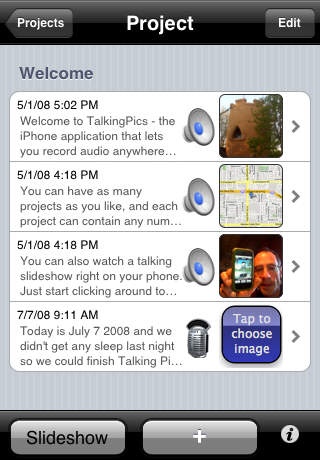
Talking Pics micro is a free but limited version of TalkingPics, a voice and audio recorder that lets you attach photos and written notes to each recording. Collections of recordings, notes, photos and maps are bundled into projects. You can play slideshows of projects or just review individual recordings whenever you want to.
Use it to store your thoughts, record your travels, or even to help remember a new face. Students and professionals alike will enjoy its ease of use and organizing abilities. Whatever you use it for, Talking Pics keeps your life in sync!
Perfect for such things as:
Family interviews or newspaper interviews.
Doctor visits! Never lose information again.
Meetings for work or brainstorming with friends.
Family trips to the zoo or a vacation.
Live music, demo recordings, found sounds.
Record traffic accident info right away.
Students lecture recordings.
Requires iOS 2.2 or later. Compatible with iPhone, iPad, iPod touch (2nd generation), iPod touch (3rd generation), iPod touch (4th generation), iPod touch (5th generation), and iPod touch (6th generation).
About TalkingPics micro
The company that develops TalkingPics micro is Stone Design Corp. The latest version released by its developer is 1.3.
To install TalkingPics micro on your iOS device, just click the green Continue To App button above to start the installation process. The app is listed on our website since 2009-02-01 and was downloaded 0 times. We have already checked if the download link is safe, however for your own protection we recommend that you scan the downloaded app with your antivirus. Your antivirus may detect the TalkingPics micro as malware if the download link is broken.
How to install TalkingPics micro on your iOS device:
- Click on the Continue To App button on our website. This will redirect you to the App Store.
- Once the TalkingPics micro is shown in the iTunes listing of your iOS device, you can start its download and installation. Tap on the GET button to the right of the app to start downloading it.
- If you are not logged-in the iOS appstore app, you'll be prompted for your your Apple ID and/or password.
- After TalkingPics micro is downloaded, you'll see an INSTALL button to the right. Tap on it to start the actual installation of the iOS app.
- Once installation is finished you can tap on the OPEN button to start it. Its icon will also be added to your device home screen.
Program Details
System requirements
Download information
Pricing
Version History
version 1.3
posted on 2009-02-01
Disclaimer
Official App Store Link
We do not host TalkingPics micro on our servers. We did not scan it for viruses, adware, spyware or other type of malware. This app is hosted by Apple and passed their terms and conditions to be listed there. We recommend caution when installing it.
The App Store link for TalkingPics micro is provided to you by apps112.com without any warranties, representations or guarantees of any kind, so access it at your own risk.
If you have questions regarding this particular app contact the publisher directly. For questions about the functionalities of apps112.com contact us.
